Error handling
There are multiple ways to handle errors in Windmill.
try/catch inside a script
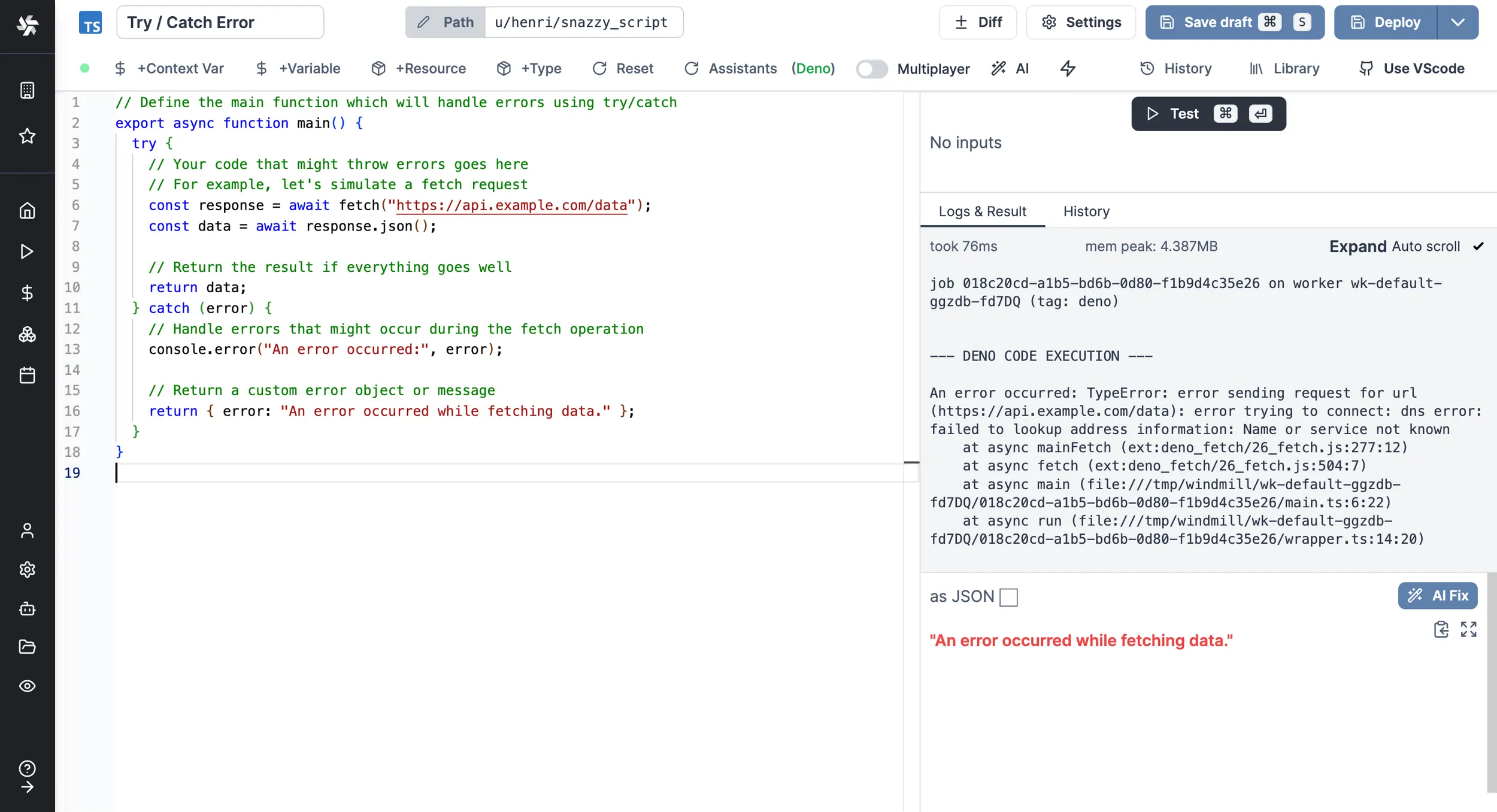
One way to handle errors in Windmill is by using the try/catch block within a Script. This method is not specific to Windmill and can be used in any programming language that supports exception handling.
Here is an example in TypeScript:
// Define the main function which will handle errors using try/catch
export async function main() {
	try {
		// Your code that might throw errors goes here
		// For example, let's simulate a fetch request
		const response = await fetch('https://api.example.com/data');
		const data = await response.json();

		// Return the result if everything goes well
		return data;
	} catch (error) {
		// Handle errors that might occur during the fetch operation
		console.error('An error occurred:', error);

		// Return a custom error object or message
		return { error: 'An error occurred while fetching data.' };
	}
}
Flows' error handlers
The Error handler is a special flow step that is executed when an error occurs within a flow.
If defined, the error handler will take as input the result of the step that errored (which has its error in the 'error field').
Error handling in flows
There are other tricks to do Error handling in flows, see:
Schedules error handlers
Add a special script or flow to execute in case of an error in your scheduled script or flow.
Schedule Error hander is an Enterprise Edition feature.
You can pick the Slack pre-set schedule error handler or define your own.
Workspace error handler
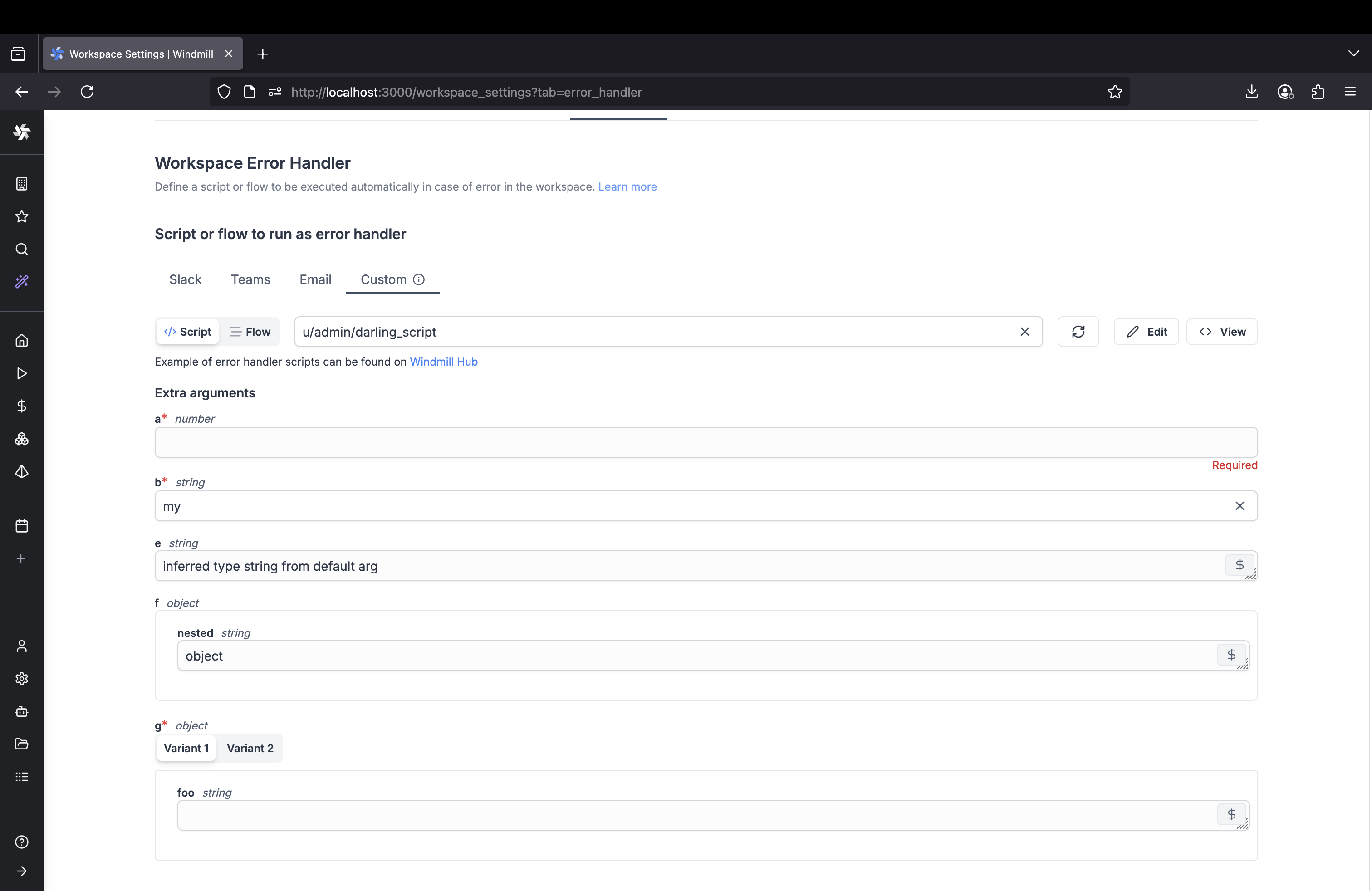
Configure automatic error handling for workspace-level errors (e.g. scheduled job failures, trigger failures without their own error handlers). Choose from built-in notification options or define custom error handling logic.
Configure workspace error handlers from Workspace Settings > Error Handler tab. The system supports four types of error handlers:
Slack error handler
Send error notifications to Slack channels. Requires workspace to be connected to Slack.
Configuration:
- Enable/disable Slack error handler toggle
- Specify Slack channel (without # prefix)
- Available on Cloud plans and Self-Hosted & Enterprise Edition
Microsoft Teams error handler
Send error notifications to Microsoft Teams channels. Requires workspace to be connected to Teams.
Configuration:
- Enable/disable Teams error handler toggle
- Select from available Teams channels dropdown
- Available on Cloud plans and Self-Hosted & Enterprise Edition
Email error handler
Send error notifications via email to specified recipients.
Configuration:
- Specify email addresses to receive error notifications
- Only available on Self-Hosted instances (not available on Cloud)
- Requires SMTP configuration
Custom error handler
Execute custom scripts or flows as error handlers for advanced error handling logic.
Configuration:
- Script or flow selection via script picker
- Additional arguments can be configured if the chosen script or flow has parameters
- Template creation options
Parameters passed to custom error handlers:
All custom workspace error handlers receive the following base parameters:
workspace_id: The workspace id where the error occurredjob_id: The job id of the failed executionpath: The path of the script or flow that erroredis_flow: Whether the error comes from a flowstarted_at: When the failed job startedemail: The email of the user who ran the script or flow that erroredschedule_path: The schedule path (only present if the error comes from a scheduled job)
Custom error handler template:
// Custom workspace error handler template

export async function main(
	workspace_id: string, // The workspace id where the error occurred
	job_id: string, // The job id of the failed execution
	path: string, // The path of the script or flow that errored
	is_flow: boolean, // Whether the error comes from a flow
	started_at: string, // When the failed job started
	email: string, // The email of the user who ran the script or flow that errored
	schedule_path?: string // The schedule path (only present if error from scheduled job)
) {
	const run_type = is_flow ? 'flow' : 'script';
	console.log(
		`Workspace error: ${run_type} ${path} run by ${email} failed in workspace ${workspace_id}`
	);
	console.log(`Job ${job_id} started at ${started_at}`);

	if (schedule_path) {
		console.log(`Scheduled job from: ${schedule_path}`);
	}

	// Add your custom error handling logic here
	// Examples: send to external monitoring, create incidents, etc.

	// Note: The actual error details are available through the job context
	// and can be retrieved using Windmill's job APIs if needed

	return { handled: true, workspace_id, job_id };
}
From the workspace settings, go to the "Error handler" tab and select your preferred error handler type.
Error handler execution
- Error handlers are executed by the automatically created group
g/error_handler - If your error handler requires variables or resources, add them to the
g/error_handlergroup - Error handlers run as different users depending on type:
- Custom, Slack, Teams error handlers:
error_handler@windmill.dev - Email error handlers:
email_error_handler@windmill.dev
- Custom, Slack, Teams error handlers:
- The system prevents infinite loops by not triggering error handlers for error handler jobs themselves
Advanced configuration
Skip error handler for cancelled jobs: Enable the "Do not run error handler for canceled jobs" option to prevent error handlers from triggering when jobs are manually cancelled.
Trigger error handlers
Each trigger type (HTTP routes, Webhooks, Kafka, SQS, WebSocket, Postgres, NATS, MQTT, GCP, Email) can have its own local error handler configured. If a trigger-specific error handler is defined, it will be used for that trigger instead of the workspace error handler. Trigger error handlers only work for scripts (not flows).
Configuring trigger error handlers
When creating or editing a trigger, you can configure the same error handler options as workspace error handlers:
- Custom script or flow: Execute your own custom error handling logic
- Slack integration: Send error notifications to Slack channels
- Microsoft Teams integration: Send error notifications to Teams channels
- Email notifications: Send error alerts via email to specified recipients
For each trigger error handler, you can also specify:
- Error handler arguments: Additional arguments for the custom error handler (only configurable if the chosen script or flow has parameters)
- Retry configuration: Number of retries and retry strategy before invoking the error handler
Parameters passed to trigger error handlers
Trigger error handlers receive the following base parameters:
error: The error details from the failed jobpath: The path of the script or flow that erroredis_flow: Whether the error comes from a flow (alwaysfalsefor triggers)trigger_path: The trigger path in format<trigger_kind>/<trigger_path>(e.g.,http_trigger/my-webhook,kafka_trigger/my-topic)workspace_id: The workspace id where the error occurredemail: The email of the user who triggered the executionjob_id: The job id of the failed executionstarted_at: When the failed job started
If using a custom trigger error handler, additional custom arguments can be passed via the error handler configuration.
Example trigger error handler
Here's a template for a trigger error handler:
// Trigger error handler template
export async function main(
	error: object, // The error details from the failed job
	path: string, // The path of the script or flow that errored
	is_flow: boolean, // Whether the error comes from a flow
	trigger_path: string, // The trigger path in format <trigger_kind>/<trigger_path>
	workspace_id: string, // The workspace id where the error occurred
	email: string, // The email of the user who triggered the execution
	job_id: string, // The job id of the failed execution
	started_at: string // When the failed job started
) {
	const run_type = is_flow ? 'flow' : 'script';
	console.log(
		`Trigger error: ${run_type} ${path} run by ${email} failed in workspace ${workspace_id}`
	);
	console.log(`Trigger: ${trigger_path}, Job ID: ${job_id}, Started: ${started_at}`);
	console.log('Error details:', error);

	// Add custom logic for trigger-specific error handling

	return error;
}
This allows you to customize error handling behavior per trigger while maintaining consistent fallback to workspace-level error handling.
Skip error handler for user-scoped scripts and flows
A workspace setting allows disabling the error handler for scripts and flows under u/ (user) paths. When enabled, errors in user-scoped runnables will not trigger the workspace error handler. This is useful to avoid noise from personal development scripts.
Workspace success handler
Configure a script to run automatically when jobs complete successfully in the workspace. This is the counterpart to the workspace error handler — while the error handler runs on failures, the success handler runs on successful completions.
Workspace success handler is an Enterprise Edition feature.
Configure workspace success handlers from Workspace Settings > Error Handler tab (in the success handler section).
Parameters passed to success handlers:
path: The path of the script or flow that succeededemail: The email of the user who ran the script or flowresult: The result of the successful jobjob_id: The job idis_flow: Whether the job is a flowworkspace_id: The workspace idstarted_at: When the job started
Success handler template:
export async function main(
	path: string,
	email: string,
	result: any,
	job_id: string,
	is_flow: boolean,
	workspace_id: string,
	started_at: string
) {
	const run_type = is_flow ? 'flow' : 'script';
	console.log(
		`Success: ${run_type} ${path} run by ${email} completed in workspace ${workspace_id}`
	);
	console.log(`Job ${job_id} started at ${started_at}`);
	console.log('Result:', JSON.stringify(result));

	// Add your custom success handling logic here
	// Examples: send metrics, update dashboards, notify on completion

	return { handled: true, workspace_id, job_id };
}
The success handler is executed by the automatically created group g/success_handler. If your handler requires variables or resources, add them to this group.
Success handler settings are cached for 60 seconds. After updating the configuration, it may take up to 60 seconds for the change to take effect.
Instance error handler
You can define a script to be executed automatically in case of error in your instance (all workspaces).
This Superadmin Error handler is defined by setting the path to the script to be executed as an env variable to all servers using: GLOBAL_ERROR_HANDLER_PATH_IN_ADMINS_WORKSPACE.
The following args will be passed to the error handler:
- path: The path of the script or flow that errored.
- email: The email of the user who ran the script or flow that errored.
- error: The error details.
- job_id: The job id.
- is_flow: Whether the error comes from a flow.
- workspace_id: The workspace id of the failed script or flow.
Here is a template for your workspace error handler:
// Global / workspace error handler template

export async function main(
	path: string, // The path of the script or flow that errored
	email: string, // The email of the user who ran the script or flow that errored
	error: object, // The error details
	job_id: string, // The job id
	is_flow: boolean, // Whether the error comes from a flow
	workspace_id: string // The workspace id of the failed script or flow
) {
	const run_type = is_flow ? 'flow' : 'script';
	console.log(
		`An error occurred with ${run_type} ${path} run by ${email} in workspace ${workspace_id}`
	);
	console.log(error);
	return error;
}
Special case: throw an error in a script
Errors have a specific format to be rendered properly in Windmill.
return { "error": { "name": "418", "message": "I'm a teapot", "stack": "Error: I'm a teapot" }}